1.When a fiscal receipt is issued
A fiscal receipt is issued by every sole proprietor and legal entity selling goods or services to individuals, and by anyone selling in a retail outlet. The law says the receipt is issued at the moment of sale and that every single sale is recorded regardless of payment method — cash, card, instant transfer or bank transfer.
The receipt is issued through an electronic fiscal device, which can be a physical register or software, and sent to the Tax Administration at the same moment. If the internet connection is down, the data is sent as soon as it is back, and within five days at the latest.
2.A sample fiscal receipt
This is what a fiscal receipt looks like, in the example published by the Tax Administration. Colours show who fills in what: blue is the ESIR (the software you issue receipts with), green the fiscal receipt processor (PFR), and red the data from the security element (BE) — the taxpayer’s PIB, name and premises, the PFR number and the QR code. Serbian receipts are printed in Cyrillic.
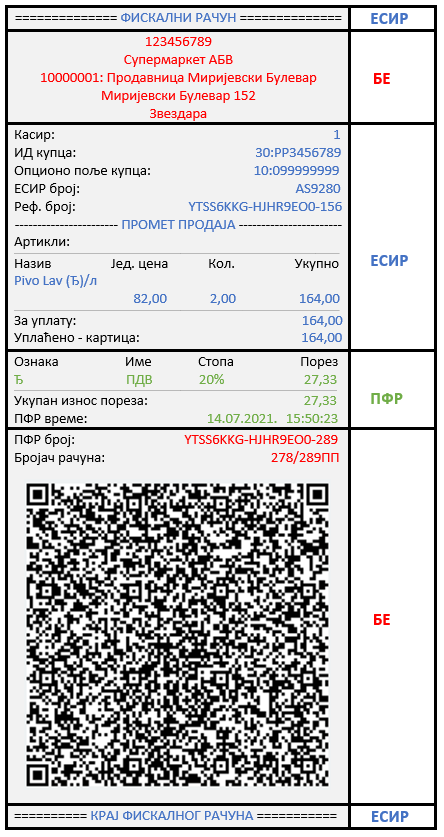
An electronic receipt sent to the customer by email has the same content, except that a verification link can stand in place of the QR code. What each line means is explained below.
3.Where the fiscal receipt number is
The fiscal receipt number is in the lower part of the receipt, below the tax, on the line “ПФР број рачуна” (PFR receipt number). In the sample above it is YTSS6KKG-HJHR9EO0-289. It is assigned by the fiscal receipt processor (PFR) when it records the receipt: it starts with the security element code and ends with a sequence number. Above it is the PFR time, the moment the receipt was recorded, and below it the receipt counter.
When a receipt is corrected or refunded, its PFR number and PFR time are used as the reference. So the PFR number is what you need when someone asks for “the receipt number”.
4.PFR number, ESIR number and counter: the difference
A receipt carries three numbers that are easy to mix up. Only one of them is the receipt number.
| What it identifies | In the sample | |
|---|---|---|
| PFR receipt number | one specific receipt — this is the fiscal receipt number; assigned by the processor when it records the receipt | YTSS6KKG-HJHR9EO0-289 |
| ESIR number | the software (ESIR) that issued the receipt, not the receipt itself | with FiskalAPI 1609/1.0 |
| Receipt counter | the sequence number for that receipt type and transaction, then the overall number | 278/289ПП |
The ESIR number is the same on every receipt issued by the same software. Its form is “ID/version”: the ID is the number under which the Tax Administration approved the software, and after the slash comes the software version. Every receipt issued through FiskalAPI has the ESIR number 1609/1.0. So you never look up a specific receipt by its ESIR number — that is what the PFR number is for.
The counter looks like “151/157ПП”: the first number is the sequence number for that receipt type and transaction, the second is the overall sequence number, and the letters show the type and transaction (ПП is normal sale, ПР normal refund).
Some receipts also show an ESIR time (ЕСИР време). That is the time from the software, not the recording time, and it is printed only when payment arrived before the receipt was issued — for example with a bank transfer.
5.What must be on a fiscal receipt
Article 5 of the Law on Fiscalization lists the mandatory data. Grouped by part of the receipt, they are:
- receipt type and transaction type (e.g. normal — sale);
- the taxpayer’s name, tax ID (PIB) and unique premises code;
- the buyer’s PIB, if the buyer is a business or sole proprietor;
- for each item: name, quantity, unit, price, tax rate label and value;
- the tax rate breakdown, tax per rate and total tax;
- the total, payment method, amount paid and change;
- date and time to the second;
- a unique sequence number, and a sequence number by receipt type and transaction type;
- a QR code for verification on a printed receipt, or a verification link on an electronic one;
- a reference to another receipt, where needed (e.g. for a refund).
Click a part of the sample to see what it means:
Click a part of the receipt
5/7
Receipt number
A unique number from the processor: the element code and a sequence number. Next to it, PFR time and the counter.
6.Receipt types and transaction types
Every fiscal receipt has a type and a transaction type, both shown in the header (e.g. “ПРОМЕТ ПРОДАЈА” — normal sale). A sale to a customer is a normal receipt; the other types serve special cases.
| Type | When it is used |
|---|---|
| Normal | every sale — the real fiscal receipt for the customer |
| Advance | the customer paid upfront, before delivery |
| Proforma | an offer before the sale; not a sale |
| Copy | a new document referencing an issued receipt; not a fiscal receipt |
| Training | testing and training; not a sale, no tax obligation |
The transaction type is sale or refund. A refund is used when money is returned to the customer or when a wrong receipt is corrected — see below.
7.How a customer verifies a receipt
The law gives every customer the right to check, right after issue, that the receipt was issued correctly. It takes seconds:
- 1Scan the QR codeWith a phone camera, from a printed receipt. An electronic receipt has a verification link instead.
- 2A Tax Administration page opensIt shows the receipt data as the Tax Administration received it.
- 3Compare the dataAmount, number, time and items must match the receipt in hand.
The verification page is always on the Tax Administration portal. If scanning opens any other address, the receipt has not been checked with the Tax Administration. The real address starts with suf.purs.gov.rs
Without a QR code, a receipt can also be checked by hand on the Tax Administration “Receipt verification” page: enter the PFR receipt number, the counter, the total and the PFR time — all four are printed on the receipt.
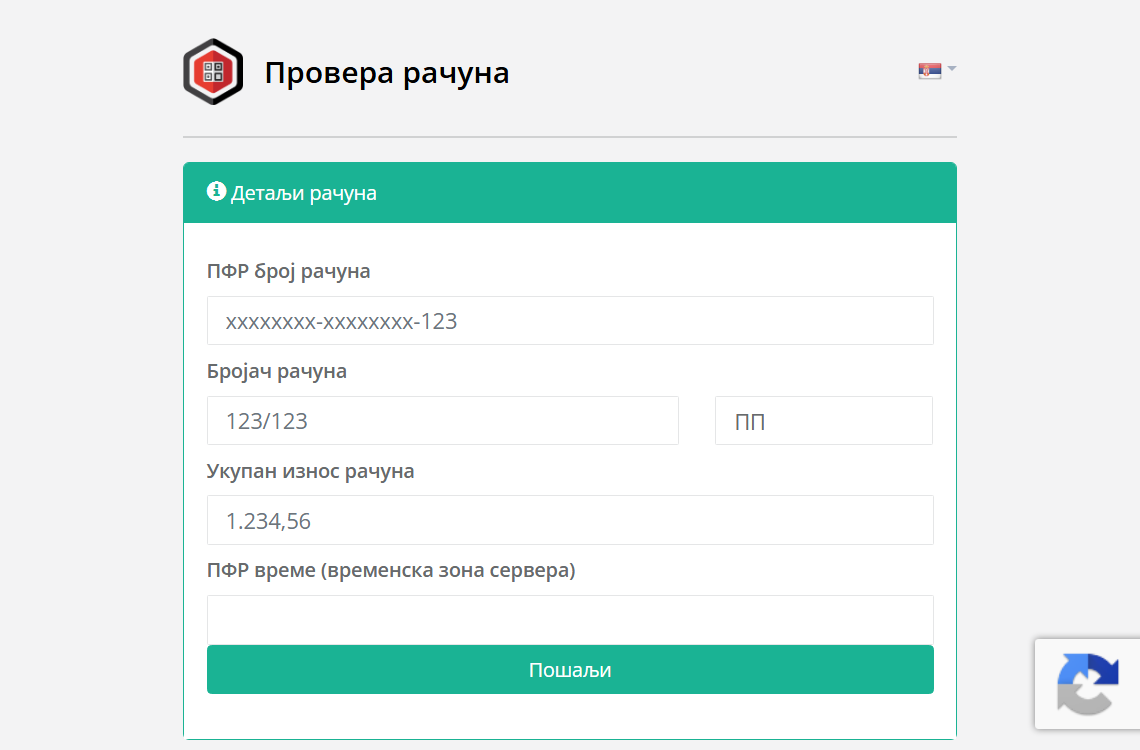
Since the 2026 amendments, a receipt whose QR code did not come from the Tax Administration system, leads to another receipt or was altered afterwards results in an immediate one-year business ban.
8.How a wrong receipt is corrected
An issued fiscal receipt is never changed or deleted — it is already with the Tax Administration. A correction is always a new document:
- 1Issue a refundThe refund references the PFR number and PFR time of the wrong receipt and cancels it in the records.
- 2Issue a new, correct receiptIf the sale did happen but with wrong data, a new sale receipt with the correct data follows the refund.
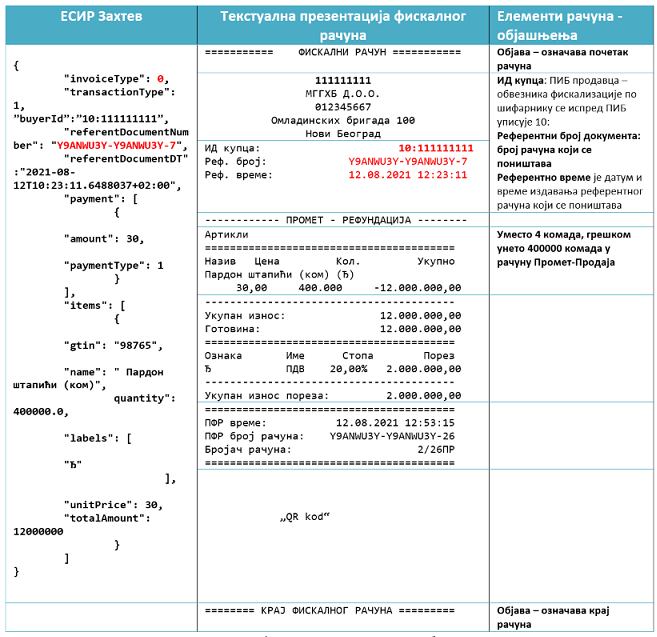
The same applies when a customer returns goods: a refund on the original receipt is issued for the returned items. With FiskalAPI a refund is one call, POST /api/racuni/refundacija, with the original receipt number.
9.Fines for not issuing a receipt
Not recording a sale or not issuing a fiscal receipt at the moment of sale risks two things at once: a fine under Article 15 and a business ban for those premises under Article 12 of the Law. The ban grows with each repeated case within 24 months.
Choose who you are and which offence it is:
Fine
300,000 – 2,000,000 RSD
Plus, for the premises where it was found
15-day business ban
The ban applies to the premises where the irregularity was found and counts within 24 months of the first. Fines: Article 15, ban: Article 12 of the Law on Fiscalization.
10.How to report a business that did not issue a receipt
A customer who did not get a receipt can report it to the Tax Administration. The easiest way is its free “Poreski alarm” app for Android and iPhone: enter the shop details and address, optionally with a photo. Reports can be anonymous.
Frequently asked questions
Among other things: receipt type and transaction type, the taxpayer’s name and PIB, the premises code, items with tax labels, tax per rate, the total and payment method, date and time to the second, a unique sequence number and a QR code or verification link. If the buyer is a business, its PIB as well.
In the lower part of the receipt, on the line “ПФР број рачуна” (PFR receipt number), between the PFR time and the receipt counter. It is a unique number assigned by the fiscal receipt processor, for example YTSS6KKG-HJHR9EO0-289.
The number of the software that issued the receipt, in the form “ID/version” — for example 1609/1.0 for FiskalAPI. It is the same on every receipt from that software, so it is not the receipt number. The receipt number is the PFR number.
By scanning the QR code on a printed receipt or clicking the link on an electronic one. Both lead to the Tax Administration portal, which shows whether the receipt was recorded and with what data.
It is never deleted or changed. A refund referencing the number and time of the wrong receipt is issued, followed if needed by a new, correct receipt.
300,000 to 2,000,000 RSD for a legal entity, 50,000 to 500,000 for a sole proprietor and 20,000 to 150,000 RSD for the responsible person. In addition, a business ban for those premises: 15 days the first time, 90 days the second and one year the third time within 24 months.
To the Tax Administration, most easily through its free “Poreski alarm” app, with the shop details and optionally a photo. Reports can be anonymous.
Sources: Law on Fiscalization (Arts. 4, 5, 6, 8, 10, 12 and 15; Official Gazette RS nos. 153/2020, 96/2021, 138/2022, 80/2026), consolidated text on the Legal Information System of the Republic of Serbia. ESIR number: Tax Administration instructions for ESIR testing. The sample receipt is fictional.