1.What a tax label is
A tax label is a letter that links an item to a tax rate. On the receipt it follows the item name, for example “Кафа 1 kg (Ђ)”. The same letters appear again at the bottom of the receipt, in the tax table: for each label on the receipt, the rate and the tax amount are printed, followed by the total tax.
The labels are Cyrillic letters, and that is not a matter of looks. The Cyrillic “А” and the Latin “A” look the same, but to the system they are two different characters, and the Latin letter is not a label. Software that types the label in Latin script therefore produces a receipt that cannot go through.
Where labels come from matters too. Software does not pick them at will: the list of labels and rates that apply to you is tied to your security element, and the fiscal receipt processor returns it on request. Software that works properly reads that list and offers only the labels on it.
With FiskalAPI, GET /api/status returns your labels with their rates as soon as the security element is connected. A label that is not on your element is rejected by FiskalAPI before the receipt reaches the Tax Administration.
2.The four most common labels
Four labels cover most sales of goods and services in Serbia. The Tax Administration lists them the same way in its instructions for advance receipts, where it prescribes a separate advance item name for each:
| Label | Rate | Who uses it |
|---|---|---|
| Ђ | VAT 20% — general rate | VAT payers, for most goods and services |
| Е | VAT 10% — special rate | VAT payers, for goods and services the VAT Law puts at the special rate |
| Г | 0% — VAT-exempt supply | VAT payers, for supplies exempt from VAT by law |
| А | 0% — not in the VAT system | flat-rate entrepreneurs and any business outside the VAT system |
Next to the label the receipt also prints the category: “О-ПДВ” (general VAT) for Ђ, “П-ПДВ” (special VAT) for Е, and “Није у ПДВ” (not in VAT) for А.
The list is not fixed forever. The Tax Administration can extend it, and other labels exist for special cases. That is why letters are never hard-coded into software — the list is read from your element and chosen from.
A letter is not the same as a rate. Check in your software or shop settings that Ђ is tied to 20% and Е to 10%. Swapped letters are a common mistake that stays invisible until the tax return — a seller at 10% then reports 20% on every receipt.
3.Which label is yours
Pick the description that fits you and see which label goes on your items:
Pick one — the label appears here.
4.Flat-rate and non-VAT businesses: always А
If you are not in the VAT system — almost all flat-rate entrepreneurs are, and many smaller entrepreneurs and companies too — every item on the receipt carries the label А. It means the tax on the receipt is zero and no VAT was charged to the buyer.
The element of a business outside VAT usually carries only that one label, so there is nothing to choose. In that case FiskalAPI sets it as the default label on your account when the element is connected, so your integration does not have to send it with every item.
The most expensive mistake a flat-rate entrepreneur can make is the label Ђ. The receipt then reports 20% VAT that was never charged — on every receipt, until someone notices. Once the element is connected, FiskalAPI rejects such a receipt, because Ђ does not exist on a flat-rate entrepreneur’s element.
Registering for VAT is mandatory once turnover in the previous 12 months exceeds RSD 8,000,000 (Article 33 of the VAT Law), and it can also be voluntary. From then on items no longer carry А but Ђ, Е or Г. Before the first receipt after the change, check which labels your element returns and update your shop settings — on the same day, not after the first tax return.
5.VAT payers: Ђ, Е and Г on the same receipt
A VAT payer picks the label per item, not per shop. One receipt can hold a book at the special rate and a charger at the general rate: each item with its own label, and the tax at the bottom is added up separately for each label.
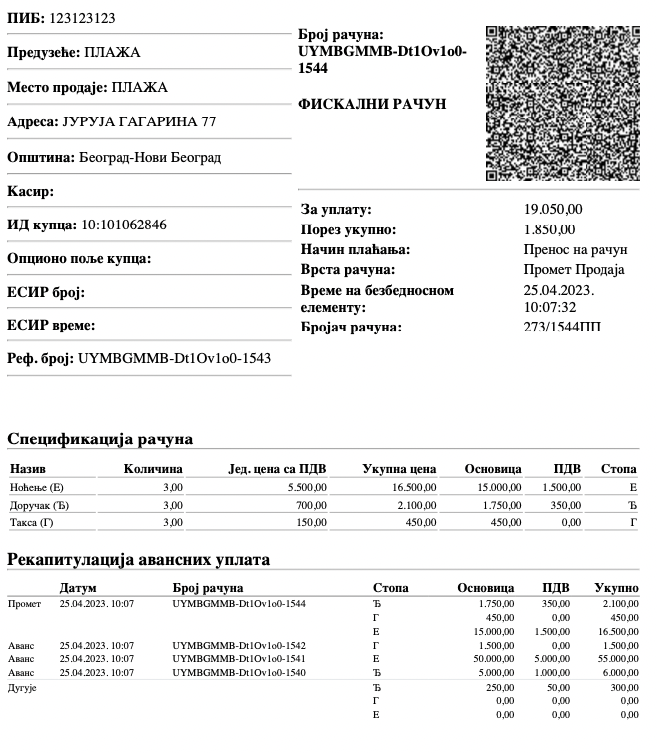
Which rate applies to which product is decided by the VAT Law, not by fiscalization. The receipt only carries what is already decided: if the product is at 10% by law, the item carries Е; if the supply is VAT-exempt, it carries Г. When you are not sure about a product, ask your accountant — not your POS software.
In an online shop the label is usually assigned automatically, from the shop settings:
- WooCommerce: by the product’s tax class — the standard class to one label, the reduced rate to another.
- Shopify, Magento, PrestaShop and OpenCart: by tax rate — 20% to Ђ, 10% to Е.
- Your own system via the API: the label is sent with every item, in the labels field.
Do not forget what is not a product: shipping, packaging or a payment fee, if you charge them. They are items on the receipt too, and each needs a label. Confirm the right one for your case with your accountant.
6.How tax is calculated on the receipt
Prices on a fiscal receipt include tax — the buyer sees what they pay. Tax is therefore not added to the price but extracted from it: at 20% the tax is 20/120 of the price, at 10% it is 10/110. An item of RSD 1,200 labelled Ђ contains RSD 200 of VAT; the same item labelled Е contains RSD 109.09.
Try it: change the prices and labels and see what the bottom of the receipt looks like.
Change prices and labels — tax is calculated instantly
Book
Phone charger
Headphones
Bottom of the receipt
The example is an illustration. Rates for your items are set by the VAT Law, and you read the labels from your element.
For a business outside VAT the tax table is still printed, but the tax in it is zero. That is not an error — it is how the receipt shows that no VAT was charged.
7.What if you issued a receipt with the wrong label
An issued fiscal receipt is never changed or deleted. A correction is always a new document: a refund referencing the number and time of the wrong receipt, followed by a new sale receipt with the right label. In this order:
- 1Fix the settingStop the mistake first: correct the label in your shop or software so the next receipts come out right.
- 2Find the wrong receiptsList every receipt issued with the wrong label — by date and by item.
- 3Issue a refundFor each wrong receipt, a refund with the same items, referencing its PFR number and PFR time.
- 4Issue a new receiptRight after the refund, a sale receipt with the same items and the correct label.
If there are many wrong receipts, or they belong to a period whose VAT has already been reported, talk to your accountant before correcting — the correction changes the tax return too.
How a refund is issued and what it references is explained step by step in the fiscal receipt guide.
Frequently asked questions
Ђ is the label for the general VAT rate of 20%. It goes on items of VAT payers taxed at the general rate, and the receipt prints “О-ПДВ” next to it.
Label А — a business not in the VAT system, 0% tax. On every item. The label Ђ would report 20% VAT that the entrepreneur never charged.
Е is the special VAT rate of 10%, and Г is a VAT-exempt supply at 0%. Only VAT payers use them, per item.
Yes, for VAT payers: each item carries the label of its rate, and the tax at the bottom is added up separately for each label. For businesses outside VAT all items carry А.
Because the labels in the Tax Administration system are Cyrillic letters. The Latin “A” looks like the Cyrillic “А”, but it is a different character and not a label, so a receipt using it cannot go through.
The receipt is not changed. You issue a refund referencing the number and time of the wrong receipt, then a new sale receipt with the right label. If there are many such receipts, or VAT for that period has already been reported, talk to your accountant.
Sources: Tax Administration instructions on issuing fiscal receipts for advance payments (labels Ђ, Е, Г and А; help on tap.suf.purs.gov.rs), the Law on Value Added Tax (Articles 23 and 33) and the Law on Fiscalization. This text is informative; confirm rates and labels for your case with your accountant.